Free · No upload · No watermark

Convert landscape video into Instagram Reels

Turn a wide video into a full-screen 9:16 Reel (or a 4:5 feed post). The phone preview shows where Instagram’s buttons and caption sit, so your titles stay readable.

  • Processed in your browser
  • No account needed
  • 1080×1920 MP4 export
How it works ↓

How it works

  1. 1Open your landscape video

    Drop in a 16:9 clip from your phone, camera or screen recording. It stays on your device.

  2. 2Check the Instagram safe zones

    The phone preview shows where the Instagram buttons and caption cover the picture, so your titles stay readable. Choose 9:16 for a Reel or 4:5 for a feed post.

  3. 3Download the Reel

    Export a 1080×1920 MP4 (or 1080×1350 for 4:5) and upload it from the Instagram app.

Landscape to Reels without losing the important part

Instagram Reels fill the whole phone screen at 9:16. A landscape video shown as-is becomes a thin strip in the middle, and a blind crop cuts people in half. This converter opens with Center Crop at 9:16 so you can choose exactly which part of the wide picture becomes your Reel, or let AI follow the people for you.

Keep your text out of the buttons

Instagram draws its like, comment, share and audio buttons on the right side, and the account name and caption along the bottom. Text placed there is hard or impossible to read. Turn on App buttons above the phone preview to see these areas while you place your titles.
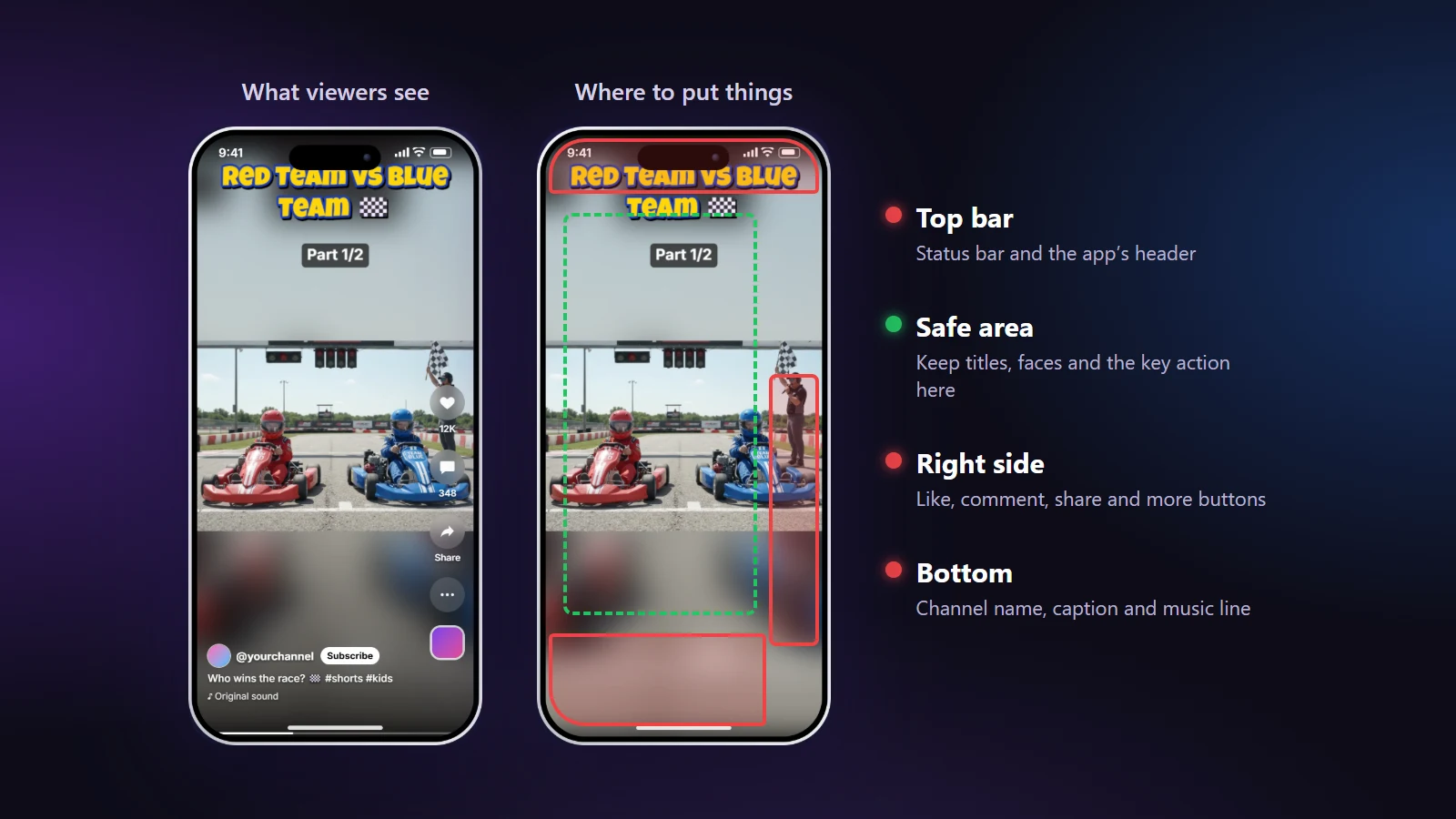
Diagram of the areas covered by app buttons on a vertical video
Red areas are usually covered by the app. In this frame our title sits too high and the top bar would cover part of it; we moved it down before exporting.

How to convert a video for Reels

  1. Open the landscape video by dropping it on the page.
  2. Choose 9:16 for Reels or 4:5 for the feed under Framing → Output.
  3. Frame the picture. Drag the box, use the quick picks (Left, Center, Right), or switch on AI Smart Crop.
  4. Add a title in the Text tab and drag it into the safe area on the phone.
  5. Export and post the MP4 from your phone or Instagram on the web.

Reels or feed post?

FormatSizeBest for
Reel (9:16)1080×1920Full-screen viewing, the Reels tab, sharing to Stories
Feed post (4:5)1080×1350Taking up the most space in the main feed
Square (1:1)1080×1080Carousels and older layouts

A 9:16 Reel is shown cropped to roughly 4:5 in the profile grid, so keep the key action near the middle. The same file also works as a YouTube Short or a TikTok.

Frequently asked questions

What size should an Instagram Reel be?
1080×1920 pixels (9:16). NineSixteenAI exports this by default. For feed posts, 4:5 at 1080×1350 takes up more of the screen than a square.
Why does my Reel look cropped in my profile grid?
Instagram shows Reels cropped to a smaller rectangle in the profile grid. Keep faces and titles near the centre of the frame so the grid preview still looks right.
Can I convert a video with two people standing far apart?
Yes. Use Split Screen: one person goes in the top half and one in the bottom half. AI Split Screen can find both people and place the halves for you.
How long can a Reel be?
Instagram has raised the Reels limit over time and now allows several minutes. Shorter Reels (under a minute) are still easier to watch to the end. Check Instagram’s current limit in the app.
Will the quality drop when I convert?
The picture is scaled once to 1080 pixels wide with a high-quality encoder. If you want the smallest file, choose “Fast”; for the best picture choose “Best” in Output.
Is my Reels video sent to Instagram or to your servers?
Neither. The converter runs in your browser and the finished MP4 is saved on your device. You upload it to Instagram yourself, from the Instagram app.
Do Reels exported here carry a watermark?
No. The MP4 you download has only what you added yourself. There is no sign-up and nothing to pay for the export.
Is this an official Instagram tool?
No. NineSixteenAI is independent and not affiliated with Instagram or Meta.