
TikTok rewards video that gets to the point and looks native on a phone. A recording made for a wide screen can do well there, but only after it is reframed, tightened and given text that the interface does not cover. This page walks through that for a creator starting from horizontal footage.
What TikTok viewers see
- A full-screen vertical video, with action buttons stacked on the right edge.
- The account name and caption at the bottom left, over the picture.
- A progress bar and navigation at the very bottom.
Anything important in those areas competes with the interface. The clear middle is yours.
The workflow
- Open the video in the TikTok video converter.
- Trim the opening. Start on the moment, not on the preparation. Use AI Auto-trim to find a dead start.
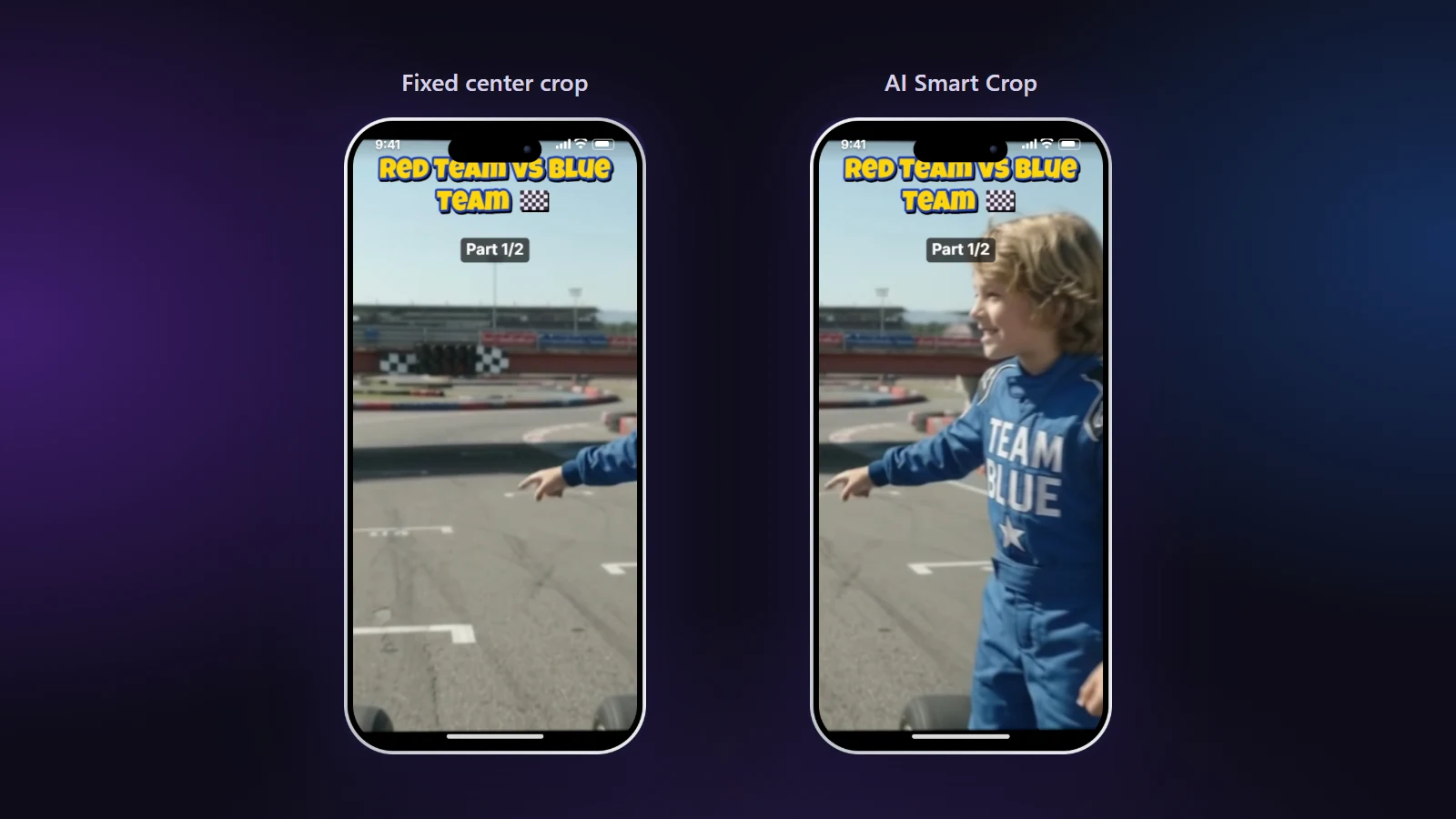
- Frame the action. Use AI Smart Crop so a moving subject stays in view; AI can follow them where a fixed crop would lose them.
- Cut for pace. If the source is long, split it into a series of parts and number them.
- Add text and sound. A line of text that says what the video is, and a track or a voiceover.
- Export and post from the TikTok app.
Pace and length
The clip should be as long as its idea. A reveal might need eight seconds; a tutorial might need two minutes. What matters is that nothing in it is filler. When you cut a long video into parts, use "My times" and pick the segments that stand on their own, instead of cutting every minute exactly.
Series that people follow
- Number the parts so viewers know where they are.
- End each part with a reason to watch the next: a question, a result you have not shown yet.
- Keep the layout, text style and logo the same across the series; the editor applies one set of settings to every part.
Sound
TikTok is a sound-first platform for many viewers. Use a clear voiceover or a track that fits. Lower music under speech with the automatic dip, and make sure you have the right to use the track you chose.
Mistakes to avoid
- Starting with a logo animation or a long greeting.
- A fixed centre crop on a person who walks. Use AI Smart Crop instead.
- Text that sits under the caption area.
- Copying the same video to every platform without checking the layout for each.
Before you post
- The first second is already the interesting part.
- The subject is in frame for the whole clip.
- Text and faces are away from the buttons and the caption.
- The audio is balanced.
Read how AI auto-reframe works to see what the AI looks for.