A fixed crop loses people the moment they move. AI Smart Crop looks through your video on your own computer, finds the people and moves the vertical frame smoothly to keep them in view.
Drop in a wide video with people moving around. The AI runs on your own computer.
2Turn on AI Smart Crop
The AI finds the people and moves the vertical frame smoothly with them. You can correct any moment by hand.
3Preview and download
Check the result in the phone preview, then export a 1080×1920 MP4.
Why a fixed crop fails
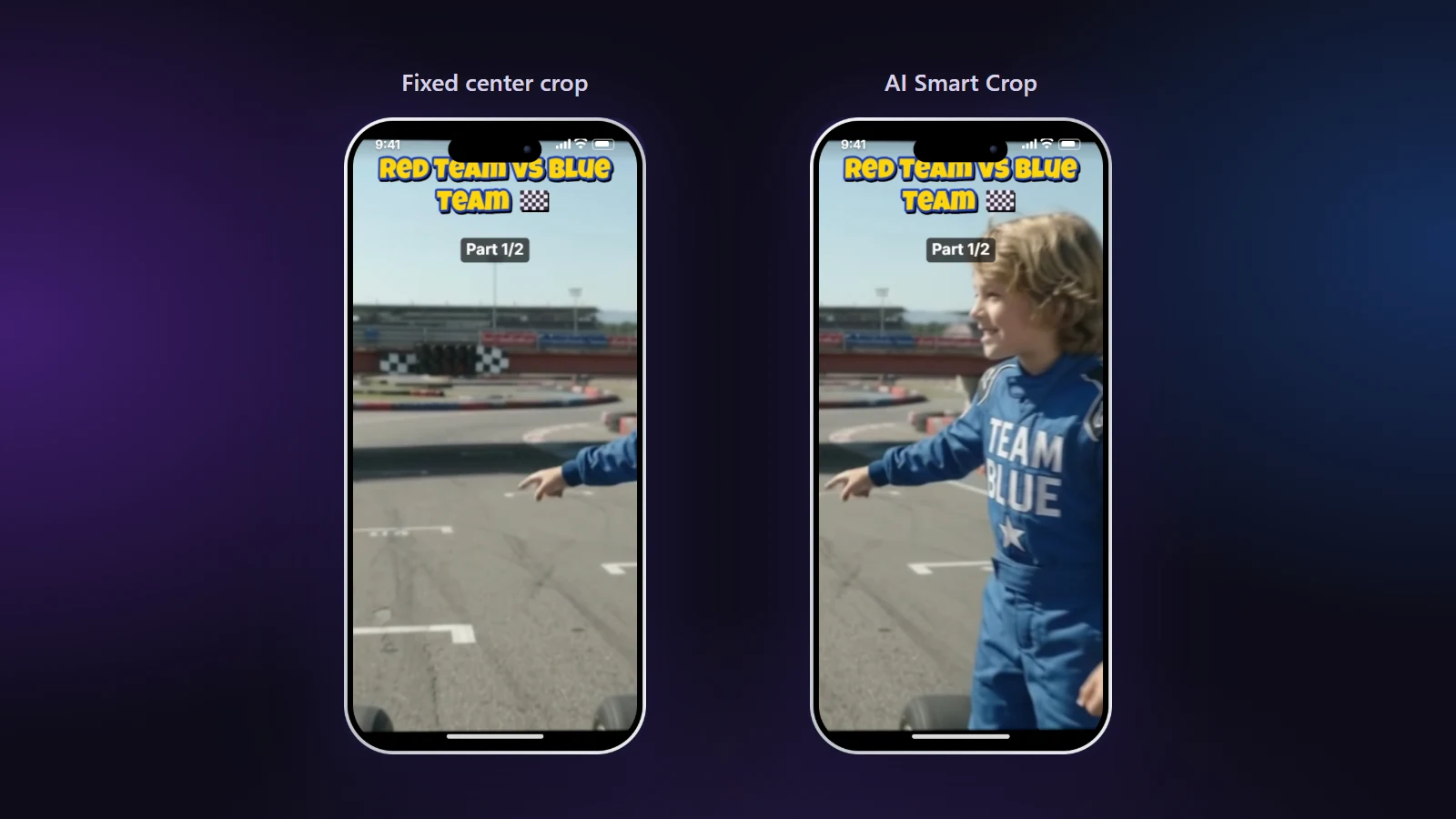
When you crop a 16:9 video to 9:16, you keep only about a third of the width. If that third stays in one place, anyone who moves leaves the frame. In our go-kart video a fixed center crop cut a driver in half while he was talking at the side of the track. AI Smart Crop moved the frame to him.
Same moment, two crops. Left: a fixed center crop. Right: AI Smart Crop found the boy and kept him in frame.
How AI Smart Crop works
When you press Follow the action with AI, a small object-detection model (Google’s open-source MediaPipe) runs in your browser and looks at the video a few times per second. It notes where people are, plus karts, bikes, pets and balls when no person is visible, and where the video cuts to a new shot. From that it plans a camera path:
If the subject stays in one area during a shot, the frame holds still, so there is no jitter.
If the subject moves a lot, the frame pans smoothly after them.
At a cut, the frame jumps with the cut instead of sliding across it.
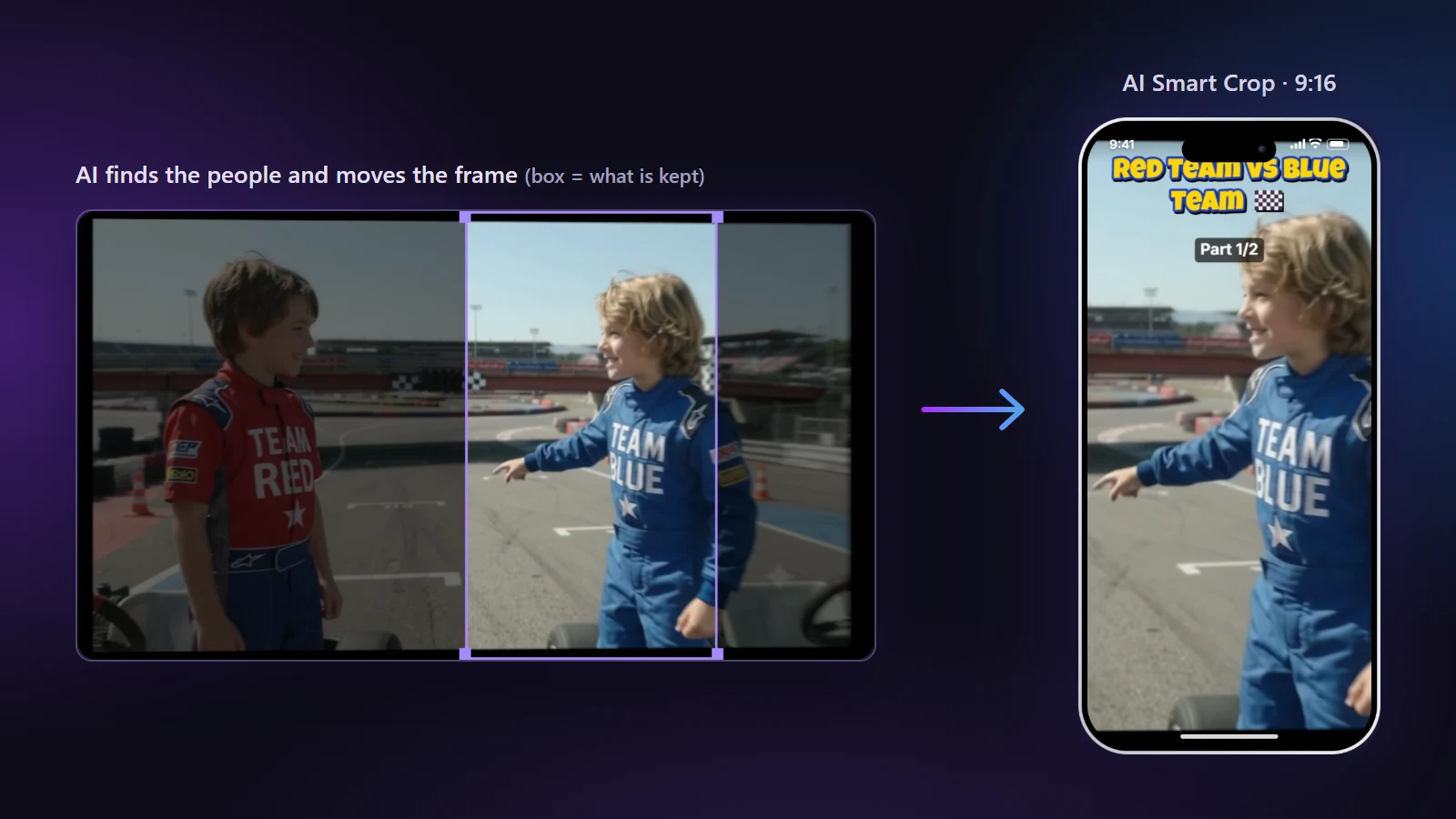
The box on the original video shows what AI Smart Crop keeps at this moment.
Fixing a moment by hand
AI is right most of the time, not all of the time. When it isn’t, pause on that moment and drag the picture. From there the frame stays where you put it until you press Back to AI here (or the shot changes), and the frame glides back to the AI path. Hand-framed sections appear as orange bands on the playback bar and can be removed one by one.
Privacy and speed
The scan happens on your computer; no frames are sent anywhere. A 2-minute 4K video took about a minute to scan on our laptop. You can switch to another tab while it runs. It continues more slowly in the background, and the tab title shows the progress. Read more in How AI auto-reframe works.
Frequently asked questions
What is AI auto reframe?
It is automatic cropping that follows the subject. Instead of keeping the same part of a wide video, the vertical frame moves to keep people (or other main subjects) in view.
Does the AI upload my video?
No. The AI model is downloaded once and runs in your browser. Frames are analysed on your computer and never leave it.
What does the AI look for?
People first. When no person is visible it looks for other main subjects such as cars, karts, bikes, animals and balls. It also detects shot changes so the frame cuts cleanly.
Does it work on cartoons or animation?
Sometimes. The model is trained on real-world footage, so animated characters may not be found. When nothing is found the site tells you, and you can frame the video by hand.
Can I correct the AI?
Yes. Drag the picture at any moment to frame it by hand; press “Back to AI here” to hand control back. Only that section changes.
Why does the frame sometimes stay still?
On purpose. If the person stays in a small area during a shot, a still frame looks more professional than a camera that follows every tiny movement.
How long does the scan take?
Roughly half the video’s length for 1080p and about the same as the video’s length for 4K on a typical laptop. It happens once per video.
Is AI auto reframe a paid feature?
No. AI Smart Crop is free like everything else here: no watermark, no sign-up and no limit on how many videos you process.